
Not for the till. The POSable till app is designed for screens 10 inches and larger, running Android 10 or later, or a Windows till. Phone screens are too small to show products, categories, the basket and payment buttons clearly during busy service.
Your phone is still useful with POSable, though. You can use it to check sales in the dashboard, count stock with the Shop Floor app, and your customers can use it for the loyalty app.
Why POSable needs a 10-inch or larger screen
A POS screen shows a lot at once: categories, products, the basket, totals, loyalty details and payment options. On a 10-inch or larger screen:
- buttons are big enough to tap quickly and accurately
- more products fit on screen, so there’s less scrolling during a rush
- customers can see their order when you turn the screen towards them
- staff make fewer mistakes, which means fewer refunds and faster queues
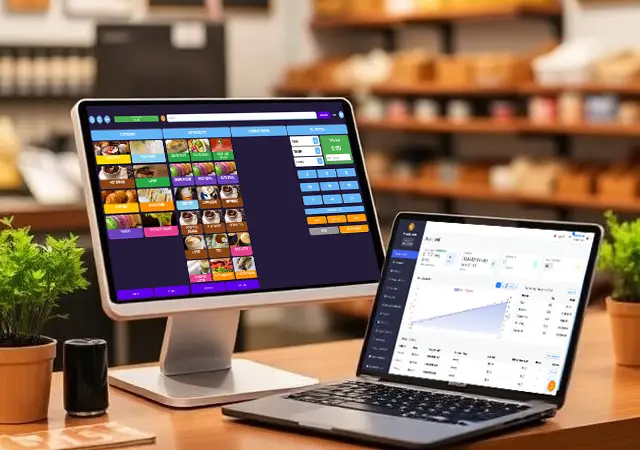
Designed for tablets of every size
POSable includes several screen layouts that adapt automatically to your device’s size and resolution, from 10-inch tablets up to large counter-top screens. It also has two themes:
- Dark theme (the default): easy on the eyes and ideal for bars, restaurants and evening trading
- Light theme: bright and clear in sunny shop windows, market stalls and well-lit counters
You can switch themes in the till’s Settings. The till always runs in landscape, the most comfortable orientation for counter use.
Device requirements
| Requirement | Android | Windows |
|---|---|---|
| Screen size | 10 inches or larger | 10 inches or larger |
| Operating system | Android 10 or later | Windows till |
| Orientation | Landscape | Landscape |
| Connection | Wi-Fi, mobile data or Ethernet (works offline too) | Wi-Fi or Ethernet (works offline too) |
| Printers | USB or Bluetooth receipt and kitchen printers | USB or Bluetooth receipt and kitchen printers |
Choosing a size: 10 to 11-inch tablets suit small counters, coffee carts and market stalls. Larger screens show more products at once, which helps busy counters with big menus.
What you can do with a phone
| App | What it’s for | Works on a phone? |
|---|---|---|
| POSable till app | Taking sales and payments | No – needs a 10-inch or larger screen |
| Dashboard (back office) | Live sales, reports, products, staff and settings | Yes, in your phone’s browser |
| Shop Floor app | Scanning products, stock counts, low stock and receiving deliveries | Yes – designed for phones |
| Loyalty app (for customers) | Customers’ points, offers and loyalty barcode | Yes – designed for phones |
Can I use an iPhone or iPad?
The POSable till app is available for Android and Windows only. There are currently no plans for an iOS version. However, the dashboard, Shop Floor app and loyalty app all run in a web browser, so managers, staff and customers can use them on iPhones and iPads too.
Frequently asked questions
Can I use my Android phone as a POSable till?
Yes, but we don’t recommend it for everyday use. The till app works on Android phones, but it’s designed for tablets of 10 inches or larger, which make serving customers faster and more accurate.
What’s the minimum Android version for POSable?
Android 10 or later.
What size tablet do I need for POSable?
We recommend 10 inches or larger for ease of use. Smaller screens still work, as POSable adapts its layout to different screen sizes and resolutions.
Does POSable work on Windows?
Yes. POSable runs on Windows tills as well as Android tablets.
Does POSable have a dark mode?
Yes. POSable has Dark (the default) and Light themes, which you can switch in the till’s Settings.
Can I check my POSable sales on my phone?
Yes. Log in to the dashboard in your phone’s browser to see live sales and reports.
Is POSable available on iPhone or iPad?
The till app isn’t, but the dashboard, Shop Floor app and loyalty app all work in the browser on Apple devices.