
POS system with Gravity Payments card payments
Run your till, stock and reporting on POSable and take card payments on the PAX or Clover Card Readers. Get your Gravity Payments processing rates, POSable adds no markup to card fees, and there are no long-term contracts.
- PAX & Clover Card Readers supported
- No POS markup on card fees
- Plans from £20/month
- 15-day free trial

Card payments that fit the way you trade
POSable is the software layer. Gravity Payments is your payment provider. Together they give you a practical checkout without locking you into one route.
Card payments from the till
Take card payments on the PAX or Clover terminal straight from the POSable app on Android or Windows. Cash, card and split payments sit in one checkout flow.
No POS markup on card fees
POSable is not a payment processor and adds no markup to your card fees. You agree your rates directly with Gravity Payments, so you know exactly where you stand.
Split payments made easy
Customer wants to pay part in cash and part by card? Take the cash first and POSable sends the remaining balance to the Gravity Payments terminal.
Built for real trading days
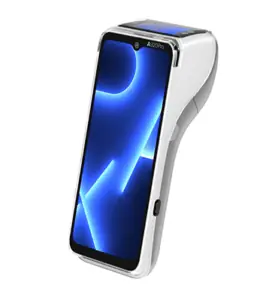
POSable keeps selling when the network dips and syncs when you are back online. The PAX A920 Pro a Gravity Payments supported terminal connects via Wi-Fi and 4G.
Sales visible in one dashboard
See live sales, payments, stock and staff activity in the POSable cloud dashboard, and export sales data to CSV for your accountant.
Use the devices you own
POSable runs on Android tablets and Windows PCs. Plan 1 covers up to 5 devices from £20/month, so you can add tills as you grow.
Start taking Gravity Payments card payments with POSable
Four simple steps from sign-up to your first card sale.
Start your free trial
Sign up for the 15-day POSable trial and set up your products, prices and tax on the cloud dashboard.
Get your Gravity Payments account
Arrange your Gravity Payments account and PAX or Clover terminal directly with Gravity. Your rates and terminal terms are agreed with them.
Connect the terminal
Link the terminal to POSable through emergepay with our help. Need a hand? Contact us.
Sell and get paid
Choose CASH, CARD or SPLIT PAYMENT at the till. Card amounts go to the Gravity Payments terminal and your sales appear in the dashboard.
Already use Gravity Payments? Start a free trial or get in touch and we will help you check your set-up. Prefer to compare providers? See all POSable payment integrations.
Keep control of your payment provider
POSable integrates with several card providers, including myPOS, Dojo, Teya and Gravity Payments (US), rather than forcing one locked payment route. That means you can compare terms and keep your negotiating power.
- The PAX A920 Pro is one of the terminals POSable integrates with, via Gravity Payments' emergepay. Gravity describes it as a touchscreen Android terminal with a built-in printer, camera, Wi-Fi, 4G and a rechargeable battery.
- Accepts everyday payment types: EMV chip, contactless and magstripe cards, plus Apple Pay and Google Pay. Surcharge ready.
- Payouts are handled by Gravity Payments. Funding timing depends on your agreement with Gravity Payments, so ask them about deposit schedules.
- No contract with POSable. Cancel any time; updates and support are included in your subscription.
Gravity Payments features and payout terms are described by Gravity Payments and may change. Always confirm current details at gravitypayments.com.
POSable and Gravity Payments: your questions answered
Does POSable work with Gravity Payments card payments?
Yes. POSable integrates with Gravity Payments through its emergepay platform and supports the PAX A920 Pro card terminal, so card payments are taken on the terminal directly from the POSable till. The Gravity Payments integration is for merchants in the United States.
Which Gravity Payments card machine works with POSable?
POSable currently integrates with the PAX A920 Pro through the Gravity Payments emergepay platform. Gravity also lists other emergepay devices, such as Clover models. Check with POSable support before ordering anything other than the PAX A920 Pro.
Does POSable charge a fee or markup on Gravity Payments card payments?
No. POSable is the point of sale software layer, not a payment processor, and we do not add a markup to your card fees. Your processing rates and terminal costs are agreed directly between you and Gravity Payments. See our transaction fees FAQ for more.
Can I use my existing Gravity Payments account with POSable?
If you already use Gravity Payments, you can start a free trial or get in touch and we will help you check that your set-up works with POSable. If you are new to Gravity Payments, you arrange your account and terminal with them and we can point you in the right direction.
Can customers split a payment between cash and card?
Yes. Press SPLIT PAYMENT in POSable, enter the cash amount taken first, and the remaining balance is requested on the Gravity Payments card terminal.
How quickly will I receive my Gravity Payments takings?
That is set by Gravity Payments, not POSable. Funding times depend on your merchant agreement with Gravity, so ask them about your deposit schedule before you sign up.
What happens to POSable if the internet drops?
POSable is built to keep trading offline and syncs your sales back to the cloud dashboard when you reconnect. The PAX A920 Pro supports Wi-Fi and 4G, according to Gravity Payments, so the card terminal has its own connection options. Read more about how POSable works offline.
How much does POSable cost?
POSable plans start from £20 per month for up to 5 devices, with a 15-day free trial and no long-term contract. See the pricing page for current plans. Gravity Payments charges are separate and agreed with Gravity Payments.
Ready to take Gravity Payments card payments with POSable?
Try POSable free for 15 days. No long-term contract, plans from £20/month, and no markup on your card fees.
POSable is not a payment processor. Card processing, rates and terminals are provided by Gravity Payments under their own terms. See cash and card payments with POSable and pricing.